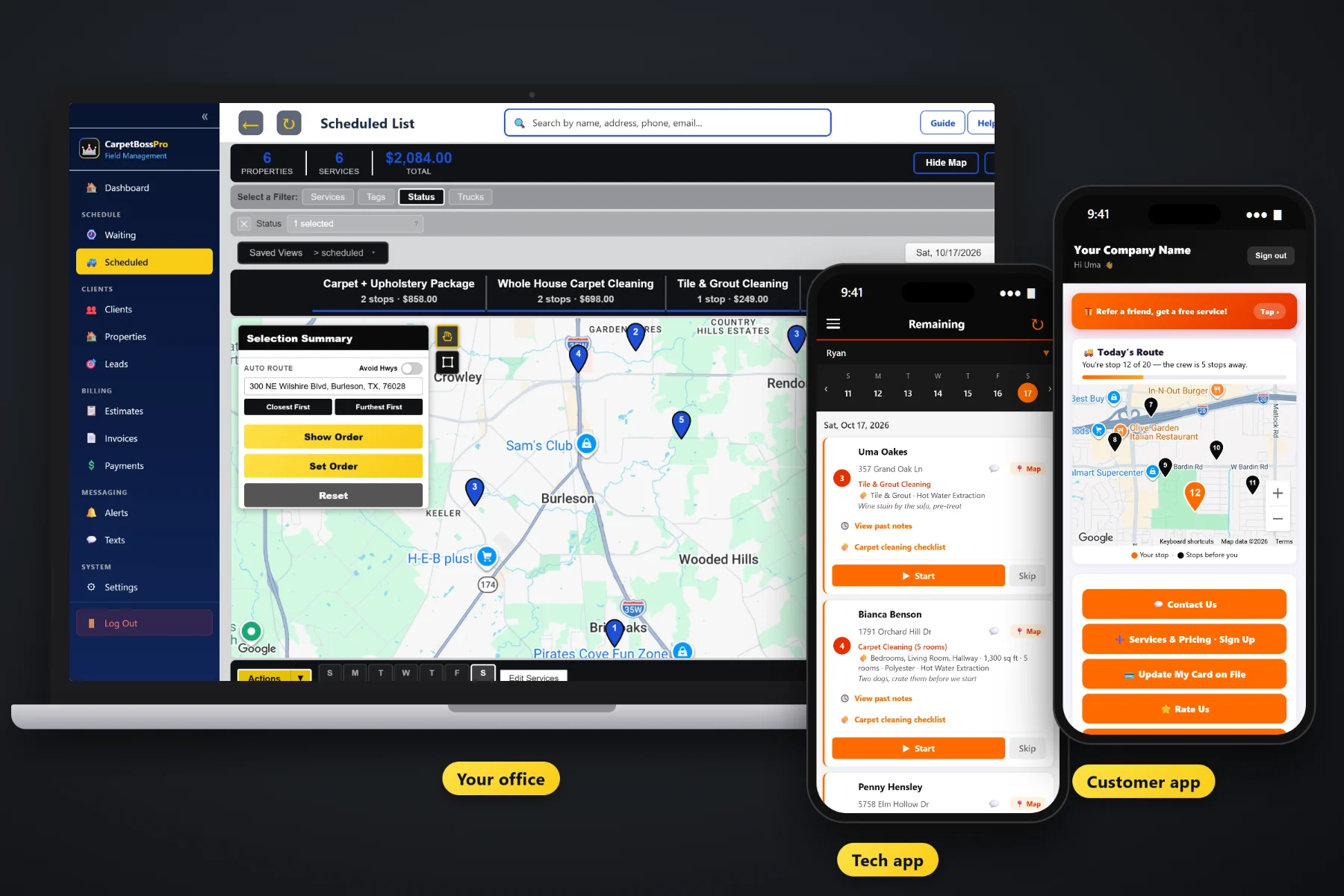
A carpet cleaning job is more than an address. It is three bedrooms and a hallway, a sofa, a pet stain by the back door, a gate code and a spot to park the truck-mount. CarpetBossPro keeps all of it on the job, puts it on the tech's phone with a carpet cleaning checklist, brings repeat customers back when they come due, and bills the card on file when the job is done.
Plans start at $59/month, and every plan includes the office, the tech app and the customer app. Job details, the carpet checklist, the Waiting List, dispatch, estimates, billing and texting all come with the platform. For the short version of everything CarpetBossPro does, start at CarpetBossPro, then use this page and its guides to go deeper.
Rooms, square feet, carpet type, cleaning method and add-ons are checkboxes on the job, not a line in a notes box.
A new job at a home fills in from that home's last job, so a repeat customer is booked in a few taps.
Walk-through, pre-vacuum, pre-treat, clean, groom, furniture on blocks and dry time explained, on the tech's phone.
Every home that came due for its yearly or six-month cleaning, on a map, so you fill a day by area.
Taken on the tech app, saved with the job, and visible to the customer in their app.
Complete creates the invoice and can charge the card on file before the hoses are back on the reel.
Whoever booked the job already knows it is a living room, three bedrooms and the stairs, plush carpet, hot water extraction, pet odor treatment in the back bedroom and a dog that stays in the kitchen. CarpetBossPro keeps that on the job and the address, so the tech reads it in the driveway instead of calling the office from the porch.
Carpet cleaners did not get into this trade to sit at a desk. CarpetBossPro asks for your services, your vans and your customer list, then gives back a schedule, a tech app and a customer app that work in the browser on the phones your crew already carries.
Per room, whole house, stairs, hallway, sofa, area rug, mattress, tile & grout, pet odor treatment, stain protector, move-out cleaning and office maintenance, at your own prices.
CSV import brings over names, phones, emails and addresses, and imported addresses are placed on the map automatically.
Yearly or every-six-months whole-house cleanings and monthly office maintenance, each set by minimum days between visits.
Fill days from the Waiting List, assign vans, auto-route from the shop, and the techs see the same order on their phones.
Most field-service software gives a job an address and a notes box. A carpet cleaning job is a list of rooms, a square footage, a carpet type, a method, a stack of add-ons and a driveway where the van has to fit. Software that only knows the address leaves the real job on a paper ticket.
Ask any carpet cleaning owner how the week really runs and you will hear the same story: a paper ticket with “3 rooms” scribbled on it, a customer who swears the hallway was included, and a pet odor treatment nobody wrote down until the tech was already rolling up the hose. Last year's customers who were due again and never got a call. A sofa quoted on the phone that never made it onto the invoice.
That information belongs on the job, not on a clipboard or in the owner's memory. When it lives in the software, any tech can run any van and every repeat customer comes back around on time.
CarpetBossPro keeps the job, the rooms, the address and the customer in one place, from the first estimate to the paid invoice.
Every tool here exists to book more repeat work, send the van to the right house with the right job, and get paid before the van leaves.
Checkboxes for rooms, stairs, upholstery, area rugs, mattresses and tile & grout, plus square feet and number of rooms.
Plush, Berber, Frieze, Wool, Nylon, Polyester or commercial low-pile, and hot water extraction, low-moisture, encapsulation or dry compound.
Pet odor treatment, stain protector and deodorizer checked on the job, so paid extras get done and get billed.
A new job at a home fills in from its last job. Estimate details carry onto the job when the estimate is approved.
Pets, gate codes, where to park the van and where to run the hose, on the address and on every visit.
From walk-through to dry time explained, with rooms cleaned, stains that did not come out and a condition the office can see.
A live map and list of every home that came due, colored not due yet, due now and overdue, plus new requests.
Jobs by day, filter by van, auto-route Closest First or Furthest First, saved views and printed route sheets.
Company login and PIN, jobs in route order, navigation, the checklist, Start / Skip / Complete, photos and a time clock.
Live route map ("You're stop 12 of 20"), invoices, online payment, card update, before/after photos and service requests.
Built from your service list, priced off rooms or square feet, approved online and turned into the scheduled job.
Invoices with sales tax, card on file, auto-charge on completion or on a schedule, and past-due follow-up.
Office buildings, apartment complexes and property managers get one statement a month covering every address.
Text customers from the office, with automated reminders and on-the-way and arrived alerts.
Bring your customer list over, and imported addresses are placed on the map automatically.
Start $59, Pro $89 and Crew $199 per month, with the tech app and customer app on every plan.
Carpet cleaning lives on repeat work. Every yearly and six-month customer comes due on their own from their minimum days between visits and lands on the Waiting List map with new requests. The office picks an area, assigns the jobs to a van and a day, auto-routes from the shop, and the tech's phone shows the same order. A common setup is one van on residential jobs during the day and one on commercial carpet after hours. For the full walkthrough, read Carpet Cleaning Software: The Complete Guide for Carpet and Upholstery Cleaning Companies.
Carpet cleaning happens inside the house, so somebody has to be home and the small stuff has to be off the floor. Reminders the night before, a text when they are next, an arrived alert and a live route map in the customer app all tell the homeowner when to expect the van. Replies come back to the office through two-way texting. After the job, the customer can see the before/after photos, the invoice and pay online, update their card, sign up for a yearly cleaning plan, and rate and refer.
Pick the plan that fits your company. Every plan starts with a 14-day free trial and no credit card.
Compare plans on the pricing page.
Every job and estimate has carpet job details: checkboxes for the rooms and areas, upholstery, area rugs, mattresses, tile & grout and add-ons like pet odor treatment, stain protector and deodorizer, plus square feet, number of rooms, carpet type, cleaning method and access notes. The tech app has a carpet cleaning checklist from the walk-through to the dry time talk.
Each repeat customer is set by minimum days between visits, such as a yearly or every-six-months whole-house cleaning or monthly office maintenance. When a home comes due it shows on the Waiting List map with its pin colored by status, so you can fill a day by area. A new job at that home fills in from its last job.
No app store download. The tech app runs in the browser on iPhone and Android and can be installed to the home screen. Techs log in with your company login and their own personal PIN.
Yes. CSV import brings in your customer list, and imported addresses are placed on the map automatically.
Yes. An office building, apartment complex or property manager can be set to Monthly billing and get one statement each month covering every address, with each line labeled with the address.
Start is $59/month, Pro is $89/month, and Crew is $199/month. Every plan starts with a 14-day free trial with no credit card. You can also click around a fully-stocked sample carpet cleaning company in the live demo with no signup.
This page covers the software as a whole. For the homepage tour of scheduling, the tech app, estimates, upholstery, billing and commercial accounts, see the full CarpetBossPro platform overview.
Practical reading on moving off paper, job details and add-ons, the carpet checklist, repeat cleanings, dispatch, the tech and customer apps, estimates, billing, monthly accounts, texting, setup, CSV import and choosing software.
Carpet job details, a carpet checklist on every tech's phone, a Waiting List for repeat cleanings, dispatch by van and payment at completion. Try CarpetBossPro free for 14 days.