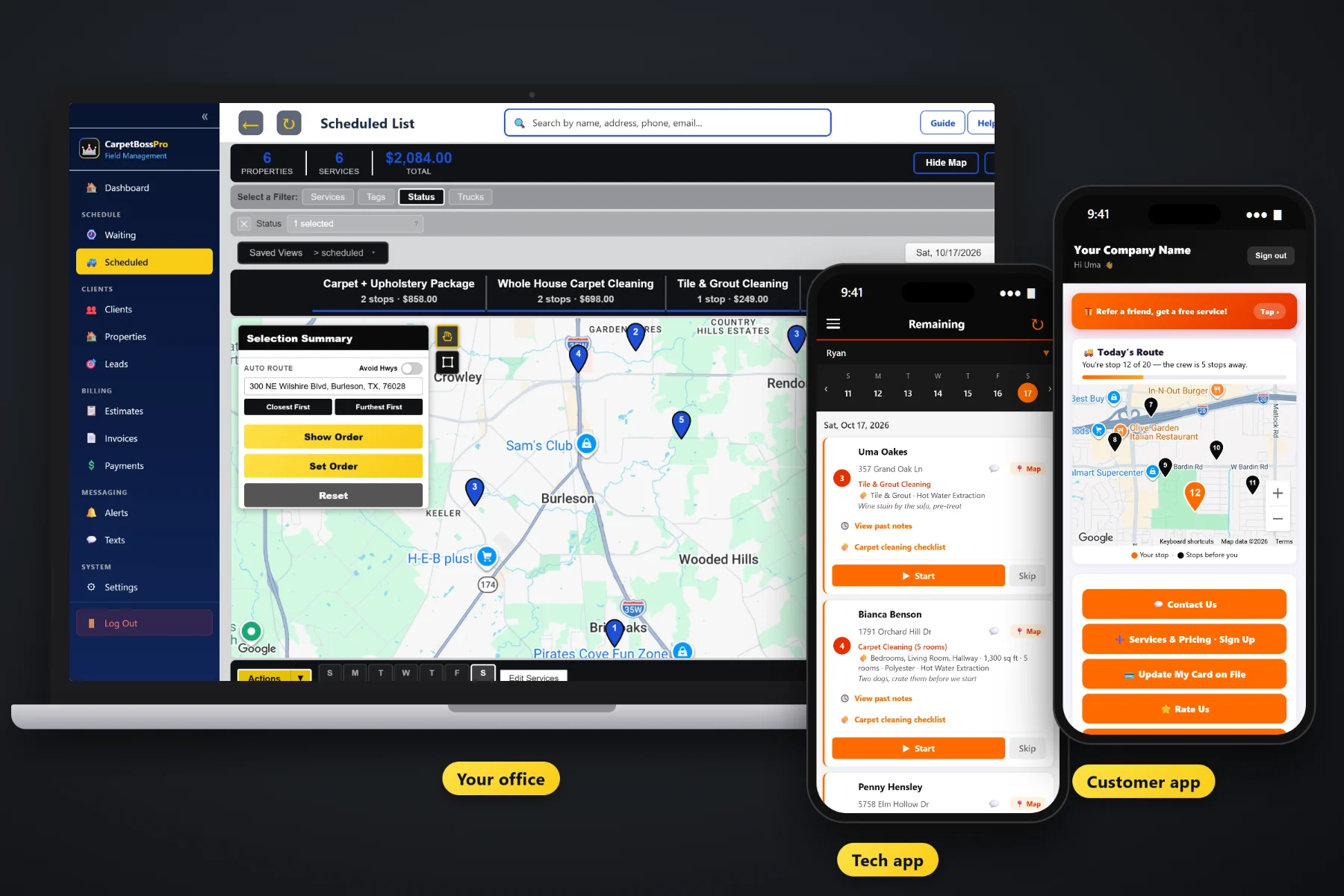
Carpet is the job that gets you in the door. The sofa, the area rug in the dining room, the guest-room mattress, the kitchen tile and the pet odor treatment are what turn a three-room cleaning into a good ticket. CarpetBossPro puts every one of them on your service list, on the quote, on the tech's checklist and on the invoice as its own line item, so nothing the customer paid for gets forgotten and nothing the tech did goes unbilled.
Plans start at $59/month, and upholstery, area rugs, mattresses, tile & grout and add-ons are part of the same job record as the carpet, not a separate module. To see how this fits with scheduling, routing, repeat cleanings and billing for the whole company, start at CarpetBossPro and then come back here for the upholstery side.
Sofa, loveseat, chair, sectional and dining chair each sit on your service list with your own price, so every quote comes out the same.
Area rugs and mattresses go on the same quote and job as the carpet, or on their own when that's all the customer wants.
Price hard floors off the property's square feet and put them on the job right next to the bedrooms and hallway.
Pet odor treatment, stain protector and deodorizer show up as steps on the tech's checklist only when they're on the job.
Photos of the sofa arm, the rug fringe and the grout lines stay with the job, and customers see them in their app.
The carpet, the sofa, the rug and the protector each show as their own line, with sales tax, and the card on file can be charged at completion.
Every CarpetBossPro job and estimate carries checkboxes for what's being cleaned, and Upholstery, Area Rug, Mattress, Tile & Grout, Pet Odor Treatment, Stain Protector and Deodorizer are right there with the rooms. The tech sees them on the phone, works them on the checklist and the office sees them checked off when the job is done.
You don't need a second system for the furniture. Set up your services once, quote them with the carpet, and let the job, the checklist and the invoice carry them through.
Add sofa, loveseat, chair, sectional, dining chair, area rug, mattress, tile & grout and each add-on with your own prices.
Put the rooms and the pieces on one estimate. The customer approves online and the estimate becomes the scheduled job.
Upholstery, rug, tile and add-on steps show up on the phone only when they are on the job, with photos and a customer note.
Each service lands on the invoice as its own line item, and the card on file can be charged when the tech taps Complete.
Generic field-service software gives a job an address and a notes box. A carpet job with a sofa, a rug and pet odor treatment is five different pieces of work, each with its own price and its own step on site.
Most carpet cleaners have lived this one: the customer mentioned the loveseat on the phone, the office wrote it on a sticky note, and the tech showed up with the carpet job and nothing else. Or the tech cleaned the dining room rug as a favor, nobody added it to the invoice, and the customer now expects it free every year.
Add-ons belong on the job record, not in someone's memory. When the sofa, the rug and the stain protector are checkboxes on the job, the tech sees them, the checklist asks for them and the invoice bills them.
CarpetBossPro keeps the carpet, the furniture, the hard floors and the add-ons together, from the first quote to the paid invoice.
Every tool here exists to quote the extra work, get it done on site and get it billed, without a second system.
Sofa, loveseat, chair, sectional and dining chair on your service list with your own prices.
Quote rugs on carpet jobs or as Area Rug Only jobs, with notes on size and where the rug lives.
Add mattresses to the same estimate and job as the bedrooms they sit in.
Price hard floors off the property's square feet and schedule them with the carpet.
An add-on checkbox on the job and a checklist step that only appears when it was sold.
Offer protection on the quote, add it on site, and check it off on the tech app.
Small add-ons on your service list, so they get priced instead of given away.
Upholstery, rug and tile cleaned, protector and deodorizer applied, stains that did not come out.
A note for the customer and a condition on every job, for the stain that would not lift.
Saved with the job and visible to the customer in their app.
Save living room bundles and common combos, with follow-up emails on open estimates.
Every piece and add-on is its own line, with sales tax and card-on-file charging.
Yearly or every-six-months plans that bring the sofa back onto the Waiting List when due.
Tag pet owners, upholstery customers and referral sources so you can find them later.
Reminders, follow-ups and replies about the add-on the customer asked about.
Start $59, Pro $89 and Crew $199 per month, with all of this on every plan.
A sofa-only call, a single area rug or a kitchen tile floor goes on the dispatch board like any other job. Drop it on the van that is already in that neighborhood, auto-route Closest First or Furthest First from the shop, and the tech's phone shows the same order. Customers on a yearly upholstery plan come due on the Waiting List on their own, so you can fill a slow day by area. For the full walkthrough, read Upholstery Cleaning Software: The Complete Guide to Running Sofas, Rugs, Mattresses, Tile and Add-Ons With Your Carpet Work.
An itemized invoice is easier to pay and harder to argue with. In the customer app, the homeowner sees the before-and-after photos of the sofa and the rug, the invoice with every piece on its own line, and the note from the tech about the stain that needed a second look. They can pay online, update their card, request another service and sign up for a yearly cleaning plan from the same place.
Pick the plan that fits your operation. Every plan starts with a 14-day free trial and no credit card.
Compare plans on the pricing page.
Yes. You set up your own services, such as sofa, loveseat, chair, sectional and dining chair, each with your own price. They go on estimates and jobs like any other service, and each one shows as its own line item on the invoice.
Yes. Area Rug, Mattress and Tile & Grout are checkboxes on the job details, and you add matching services to your list. Tile & grout can be priced off the property's square feet. A job can be carpet plus any of these, or just one of them on its own.
Pet Odor Treatment, Stain Protector and Deodorizer are checkboxes on the job. When one is on the job, its step shows up on the tech's carpet checklist, so it gets done and checked off. When it isn't, the step stays off the list.
The tech notes the request on the job or texts the office, and the office adds it as a line item from your service list, so the invoice matches the work and the price is your price, not a guess.
The checklist has a place to record stains that did not come out, a condition for the job and a note for the customer. Before-and-after photos are saved with the job, and the customer can see them in their app.
Start is $59/month, Pro is $89/month, and Crew is $199/month. Upholstery, rugs, mattresses, tile and add-ons are on every plan, and every plan starts with a 14-day free trial with no credit card.
Upholstery, rugs and tile are one piece of how CarpetBossPro runs a carpet cleaning company. For scheduling, routing, repeat cleanings, the tech app and billing, see the full CarpetBossPro platform overview.
Practical reading on per-piece pricing, area rugs, mattresses, tile & grout, pet odor work, stain protector, add-ons at the door, checklists, photos, customer notes, add-on-only jobs, line-item billing, repeat customers and referrals.
Upholstery, rugs, mattresses, tile and add-ons on the quote, on the checklist and on the invoice. Try CarpetBossPro free for 14 days.